One ERP for more than one industry · 16 modules · running in companies across Egypt
One system that fits your business,one step ahead of every problem
A computer or mobile shop, a hypermarket, a wholesale and distribution company, a restaurant, or an after-sales service operation: pick your business type and SABK arrives with its own menu, home screen and commands. Inventory, purchasing, accounting and HR sit on the same database, and management sees it all in real numbers.
Pick your business type, and SABK sets itself up for it
A company chooses its business type and SABK arrives configured for it: its own menu, home screen and quick commands. The core is the same for everyone; what changes is what you see every day.
After-sales service & service centers
Tickets by serial number, appointments sized to technician capacity, and closure by customer code
Technicians on the map with their own app, and authorized service centers with statements
Spare parts, warranty, and claims to brands and suppliers
Customers log and track their own requests, with an AI assistant answering them
Computer & mobile shops
POS search by barcode, code or name, with split payments and e-receipts
Retail, semi-wholesale and wholesale tiers, with prices that follow the quantity
Dollar-based pricing, a serial number on every device, and spec fields you define
Counter repairs: an intake receipt, and a link where the customer approves the quote and tracks the device
Supermarkets & hypermarkets
Cashier shifts with opening cash, closed out on expected vs counted
Unit and carton barcodes on the same item
Warehouses, shelf locations, transfers and barcode stock counts
Discount limits with supervisor approval, and returns from the same screen
Wholesale & distribution
Wholesale and semi-wholesale price lists with quantity breaks; each customer gets their tier automatically
Two units per item with a conversion factor: receive by the carton, sell by the metre
Imports in foreign currency, with freight, customs and clearance landed into item cost
Purchase orders and supplier invoices with three-way match, plus a supplier portal
Showrooms & retail stores
POS with shifts, and receipts carrying the e-receipt QR
Item cards with image, brand, shelf location and a price per tier
A rule that blocks selling below cost, or asks for approval
Cash boxes, custody and cheques, with journal entries posted automatically
Restaurants & cafés
POS with cashier shifts and split payments
Items, stock, purchasing and suppliers
Accounting and cash boxes, with journal entries posted automatically
Table and kitchen screens are being built and are not in the system yet
With every business typePurchasing & importsWarehouses & stock countsAccounting, cash & chequesE-invoice and e-receipt readyHR & payroll
Sales & pricing
Sell to every customer at the right price, and never get caught out by the dollar
A point of sale with shifts, retail, semi-wholesale and wholesale price tiers, a complete item card, and pricing that moves with the exchange rate. For shops, hypermarkets and wholesalers.
Cashier shiftsA shift opens with opening cash and closes on expected vs what was actually counted.
Barcode, code or nameThe cashier finds an item by its barcode, its code or its name.
Split paymentOne receipt can be paid with more than one payment method.
Discount limitsDiscounts have a limit; anything above it needs a supervisor’s approval.
Price tiersRetail, semi-wholesale and wholesale: each tier is a price list with quantity breaks, so the price follows the quantity.
Customer tiersA customer with a tier gets its price automatically; the cashier picks the tier for everyone else.
Selling below costAn optional rule: block sales below cost, or allow them with approval.
Item cardBrand, category, image and shelf location, a price and margin per tier, and stock in every warehouse.
Multiple barcodes per itemThe carton barcode and the importer’s barcode on the same item.
Your own spec fieldsSpec fields your company adds to the item card itself.
QR receiptsReceipts come out with the Egyptian e-receipt QR code.
Two units per itemTwo units with a conversion factor: receive by the carton, sell by the metre.
Serials & lotsSerial or lot tracking for the items that need it.
Warehouses & shelvesWarehouses, shelf locations and transfers between them, with stock counts done by barcode.
ReturnsReturns are handled from the same POS screen.
Retail, semi-wholesale, wholesale: the right price shows up on its own
Each tier is a price list with quantity breaks. The cashier picks the tier, a customer with a tier on file gets it without anyone having to remember, and the price follows the quantity on the receipt.
Discounts have a limit; above it, a supervisor approves.
An optional rule blocks selling below cost or asks for approval.
The item card shows every tier’s price and margin at a glance.
Item cardExample
ItemAC1200 Wi-Fi router
Category · shelfNetworking · A-12
Cost in foreign currency$24.00 × 49.20
On handShop 14 · Warehouse 60
Price and margin per tier
1,420Retail · 20%
1,325Semi-wholesale · 12%
1,265Wholesale · 7%
The dollar moved? Review before and after, then apply
Every item carries its cost in foreign currency. SABK multiplies it by the exchange rate and each tier’s margin, rounds the result up, and shows you the old price next to the new one before you apply.
A home-screen alert when the exchange rate has moved since the last pricing.
The same calculation for every tier: retail, semi-wholesale and wholesale.
Every price change is logged.
Dollar-based pricing · example5 items
The dollar moved since the last pricing
It was 49.20, now 50.50 · 5 items will change price.
Preview: AC1200 Wi-Fi router
Retail 1,420 → 1,455 · wholesale 1,265 → 1,300.
New prices applied
The change is logged and the POS now sells at the new price.
The trade home screen: your shop’s day in front of you the moment you open
Sales today and this monthPlus today’s sales broken down by price tier and payment method.
Latest receipts and best sellersWhat just sold, and the items that move the most.
Needs youWhat is waiting for your decision, including an alert if the dollar has moved since the last pricing.
Behind them: purchasing and imports, plus counter repairs
Purchasing with three-way matchPurchase orders and supplier invoices matched against receipts, plus supplier warranty claims and a supplier portal.
Imports at their true costAn import file in foreign currency, with freight, customs and clearance allocated into item cost.
If your shop repairs devicesAn intake receipt for the device, a link where the customer approves the quote and tracks the repair, and WhatsApp notifications.
Modules
A complete ERP, from the first purchase request to the monthly report
16 modules on one database, from point of sale, inventory and after-sales service to accounting and payroll. Your business type decides what opens in front of you, so switch on what your company needs today and open the rest when you need it, without changing systems.
After-sales service
AS
Tickets by serial number, with a full history for every unit
Appointment slots sized to the technicians you actually have, so you never overbook
Authorized service centers with monthly statements and scorecards
QR warranty activation, maintenance contracts and extended warranties
Technician library: lessons, videos and error codes
Ticket #20431Top-load washer · SN 7G42K1180
2:14 h left on SLA
Logged
Scheduled
On the way
Closed with customer code
Technician: Ahmed · Nasr CityParts: Drain pump · reserved
Field tracking & visits
FT
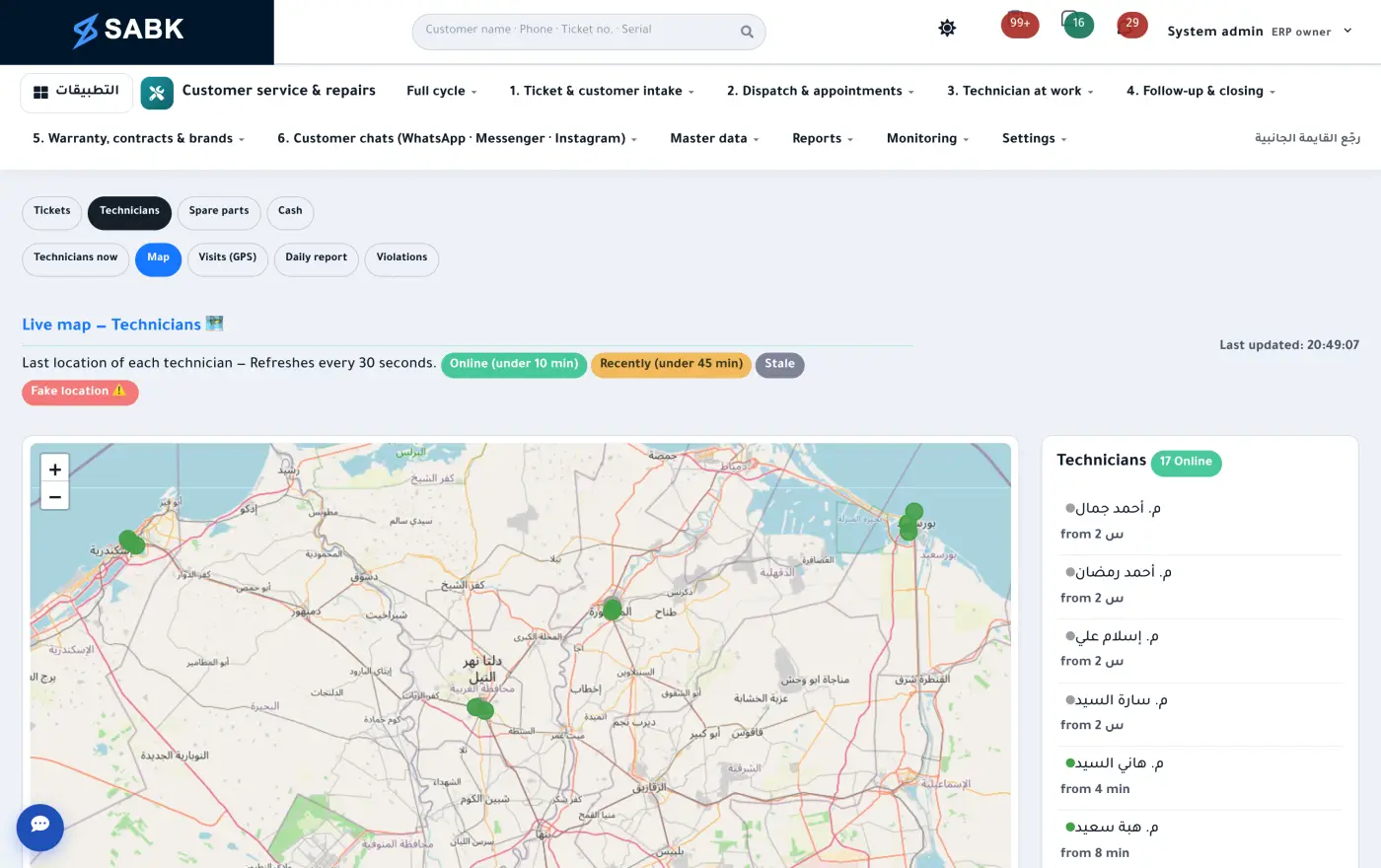
A live map of technicians at work
Every visit recorded with place and time
A daily report and route for each technician
Flags for late arrivals and off-site check-ins
CRM
CRM
A sales pipeline with stages and values
Sales rep visits and activities
Targets for every rep, tracked
Customer segments and WhatsApp campaigns
Sales & dealers
SD
Quotes, price lists with quantity breaks, and credit limits
Distributors and dealers, with their own portal
E-invoicing and returns
Shipments and delivery runs
Point of sale
POS
Cashier shifts with proper handover, opening cash and close-out
Search by barcode, code or name, and split payments
Retail, semi-wholesale and wholesale tiers, and discount limits with approval
E-receipts for consumers, and returns from the same screen
For shops and hypermarkets, and for spare-parts sales at the branches
Purchasing & suppliers
MM
Purchase requests with approval levels
RFQs and side-by-side supplier comparison
Three-way match: PO, receipt and invoice
Import files: freight, customs and clearance landed into item cost, plus FX differences
Supplier scorecards and a supplier portal
Inventory & spare parts
WM
Shelf locations, barcodes and expiry dates
Two units per item with a conversion factor, plus serials and lots
Reorder points, barcode count sessions, and parts reserved per ticket
Spare-parts forecasting from service demand
Transfers between warehouses and branches
Planning
PP
Master production schedule and scheduling
Bills of materials and engineering changes
Material requirements from the plan
Work-center capacity
Manufacturing
MFG
Multi-stage work orders
Semi-finished goods and scrap
Subcontracting
Machine maintenance
Quality
QM
Incoming inspection before stock is accepted
Quality cases, corrective actions and follow-up
Repeat faults routed back to the factory and supplier
Cost of quality and post-warranty profitability
Products & serials
MD
A single register of models and SKUs
Item cards with brand, image, multiple barcodes and a price per tier
Serial numbers from the factory to the customer
Exploded-view parts albums for every model
Custom fields you add yourself
Treasury
TR
Cash boxes and a cheque portfolio
Staff custody and installment advances
Payment requests with approvals
13-week cash forecast
Accounting
FI
Journal entries, statements and cost centers
Banks and fixed assets
VAT and e-invoicing
Budget vs actual
HR
HR
Employee files, departments and job titles
Attendance and leave
Technician certifications and skills
Payroll
PY
Salaries, allowances and deductions
Social insurance and payroll tax
Salary advances repaid in installments
Hiring & performance
TM
Openings, applicants and interviews
Regular performance reviews
Development plans
Built into every moduleManagement dashboards and reports, each visible only to who it belongs toOne inbox for every approvalPer-user permissions and a full audit trailPortals for dealers, suppliers and customersApps for technicians and sales reps
Everything connectedFactory, shop or service center: the transaction flows through the whole company and the journal entry posts itself
1Buy or import
2Receive & inspect
3Stock & shelves
4Make or price
5POS or invoice
6Returns or warranty & service
7Post & report
Platform
Your company on its own link
Every company on SABK gets a link under its own name, with its own database and files. The system itself is a single code base, so updates reach every company.
A link under your name:your-company.sabk.online, where you and your team sign in.
Its own database and files: each company’s data and attachments live in their own place.
Sized to your company: modules, number of users and subscription period are set per company.
One code base for all: every update to the system reaches every company.
Set up for your business: the menu, home screen and quick commands follow the business type you chose.
your-company.sabk.onlineExample
Business typeComputer & mobile shop
Database & filesThe company’s own
ModulesPOS · Inventory · Accounting
Users & subscriptionSet per company
One code base · updates reach everyone
If your business is repair and after-sales service
The deepest part of SABK, because it was built inside a real service operation
This is where SABK started, and today it is one business type among several, not the whole system. It covers everything a service team needs, from the customer’s first call to the factory learning why the unit failed.
Technician trackingA live map, GPS-verified visits and a daily report for every technician.
Capacity-based bookingEach slot’s capacity comes from the technicians available, so you never promise a visit you can’t make.
Customer self-serviceCustomers log their own requests and track progress without calling you.
AI assistantAnswers customers from your own knowledge base; anything sensitive waits for a staff approval.
QR warranty activationCustomers scan the code on the unit to activate their warranty.
Customer-code closureA ticket only closes with a code sent to the customer.
Follow-up queuesEvery call logged with its outcome and the next call date.
Alerts & escalationWarnings before an SLA breach, and escalation for any customer left 48 hours.
Morning briefingEvery supervisor starts the day with one line of what needs doing.
Authorized centersA workspace per center, monthly statements, scorecards and quality audits.
Brands and their claimsServicing several brands? Each brand keeps its own SLA, labour rate and logo, and the monthly warranty claim is ready to send.
WhatsAppTicket updates, verification codes and marketing campaigns from ready templates.
Service contractsAnnual contracts and extended warranties with tracked visits.
Automatic fault classificationSABK suggests the fault from the customer’s description; the technician confirms it at the unit.
Visit preparationThe parts this model and fault usually need, and their stock level, before the technician leaves.
Unhappy customers flagged the same dayA bad rating, an unresolved issue or an overcharge reaches the supervisor and support manager immediately.
Free call listsCustomer segments with one-tap call and a pre-written WhatsApp message from your own phone, no subscription needed.
Pickup & delivery pointsThe customer drops off at the nearest point; the device carries a barcode and custody until it's back — full stages below.
Team chatThe talk stays next to the ticket: chats and groups inside the system, with tickets appearing as live status cards.
Damage storeDefective parts flow from tickets into a dedicated store, received in bulk with counts confirmed per center.
VIP customers ⭐Shorter deadlines and priority for key customers, a bell when the customer calls to ask, and escalation before and after the deadline.
Supplier claimsDefective parts are bundled into a supplier claim: credit note, refund or replacement parts — with any gap booked as a loss.
Customers book their own visit, in a slot you can actually honor
From a link or a QR code, the customer enters their details and the unit’s, then picks from the slots that still have room. Full slots close on their own based on your technician headcount.
A tracking page, so customers see progress without picking up the phone.
Sales reps can log tickets on a dealer’s behalf too.
Book a service visit2 of 3
UnitTop-load washer
IssueWon’t spin
Pick a time · Thursday, 15 October
10 – 12Full
12 – 23 left
2 – 45 left
4 – 64 left
6 – 8Full
8 – 102 left
Booked · ticket no. #20458
The visit you promised is the visit that happens
Booked to capacityEach slot is sized to the technicians available, so nothing is overbooked.
Rescheduling with a reasonEvery postponement needs a written reason, and who moved it, and how often, is on record.
Punctuality that paysAn on-time rate for every technician and center, which you can tie to bonuses and deductions on their statement.
Everyone starts the day knowing exactly what’s expected
At 8:45 every morning, each supervisor and follow-up agent gets a briefing in their notifications. Any customer nobody has called in 48 hours is escalated to the follow-up manager automatically.
Follow-up queues with every call’s outcome and the next one scheduled.
A ‘My centers’ page for supervisors, in red, amber and green.
A weekly audit sample that feeds each center’s score.
Notifications0
Good morning, your centers (8)
2 centers need attention · 5 late · weekly audit: 3 calls left.
Escalation: ‘no answer’ queue
4 customers not called in 48 hours.
Ticket close to SLA breach
Ticket #20431, 2 hours left on target.
Warranty activated from the unit itself
The customer scans the code on the unit to activate the warranty, and the serial is tied to the unit’s record from the factory to their home. Tickets only close with a code sent to the customer.
Annual contracts and extended warranties with tracked visits.
Ticket updates and verification codes over WhatsApp.
Warranty activatedWasher · SN 7G42K1180Valid until March 2028
For service and operations managers
Find the problem before the customer complains
Tools that measure what customers actually feel: nobody called me, the technician didn’t show, I’ve called five times. And they tell you where the delay comes from.
Time to first contactA ‘called the customer’ button, a list of everyone waiting over 4 hours, and a rate for every center.
Where the time goesEach ticket’s age broken down: waiting for parts, for the customer, for approval, or for the technician. Per center.
Missed appointmentsAppointments that passed with no visit, by center and technician, plus today’s that nobody has started.
Absent techniciansThe center marks the absence, the technician’s tickets go back for reassignment, and the center and supervisor are alerted.
Customers chasing youEvery ‘where’s my technician?’ call is counted; from the third call, the center and supervisor are told.
Key accountsHotels, compounds and corporates get a shorter SLA and a ⭐; any ticket that runs over escalates on its own.
Upcoming workloadExpected tickets for the coming weeks by region and category, based on last year’s season, and how many technicians each center is short.
Weekly operations reviewThis week against last, decisions with an owner and a due date, and reminders until they’re done.
Decisions made in the meeting don’t get forgotten
Every week, one page builds itself: incoming, closed, late and first-time-fix, next to last week. Each decision is recorded with an owner and a due date, and if the date passes SABK reminds them every day.
The 5 weakest centers and 5 most common faults this week.
All from your own data, with no extra subscription.
Operations review · sample3 decisions
18 customers not contacted within 4 hours
First contact on time: 78% (last week 71%).
60% of delays: waiting for parts
Decision: purchase request for the top 5 parts · Owner: Inventory · by Thursday.
A center short of two technicians
Load at 140% of median · Decision: move a technician from another center.
Pickup & delivery points
The customer drops off at the nearest point — and picks up with a code
A complete fulfillment mode inside the ticket: every device gets a barcode and a custody record from the moment it's dropped off until it's back in the customer's hands — every stage logged with photos, signature and location.
1
Drop-off at the point
Device barcode and proof photos of its condition on arrival.
2
Trip to the workshop
The driver scans each device; custody formally transfers to him.
3
Repair
The central workshop works while the ticket updates live.
4
Quality check
A QC stage before the device leaves the workshop.
5
Return trip
Back to the same point, scanned and in custody like the way in.
6
Customer pickup
By code, signature or an authorized delegate — then the ticket closes.
A locked custody log: who holds the device at any moment, and it can't be erased.
One timeline inside the ticket: status, custody and the duration of every stage.
Point staff see only their point's tickets; drivers see only their trips.
“My trips” for drivers: today's devices grouped by pickup and drop-off location, with a scan box.
Switched on as a company rule when your workflow needs it, and your points import from Excel.
AI assistant
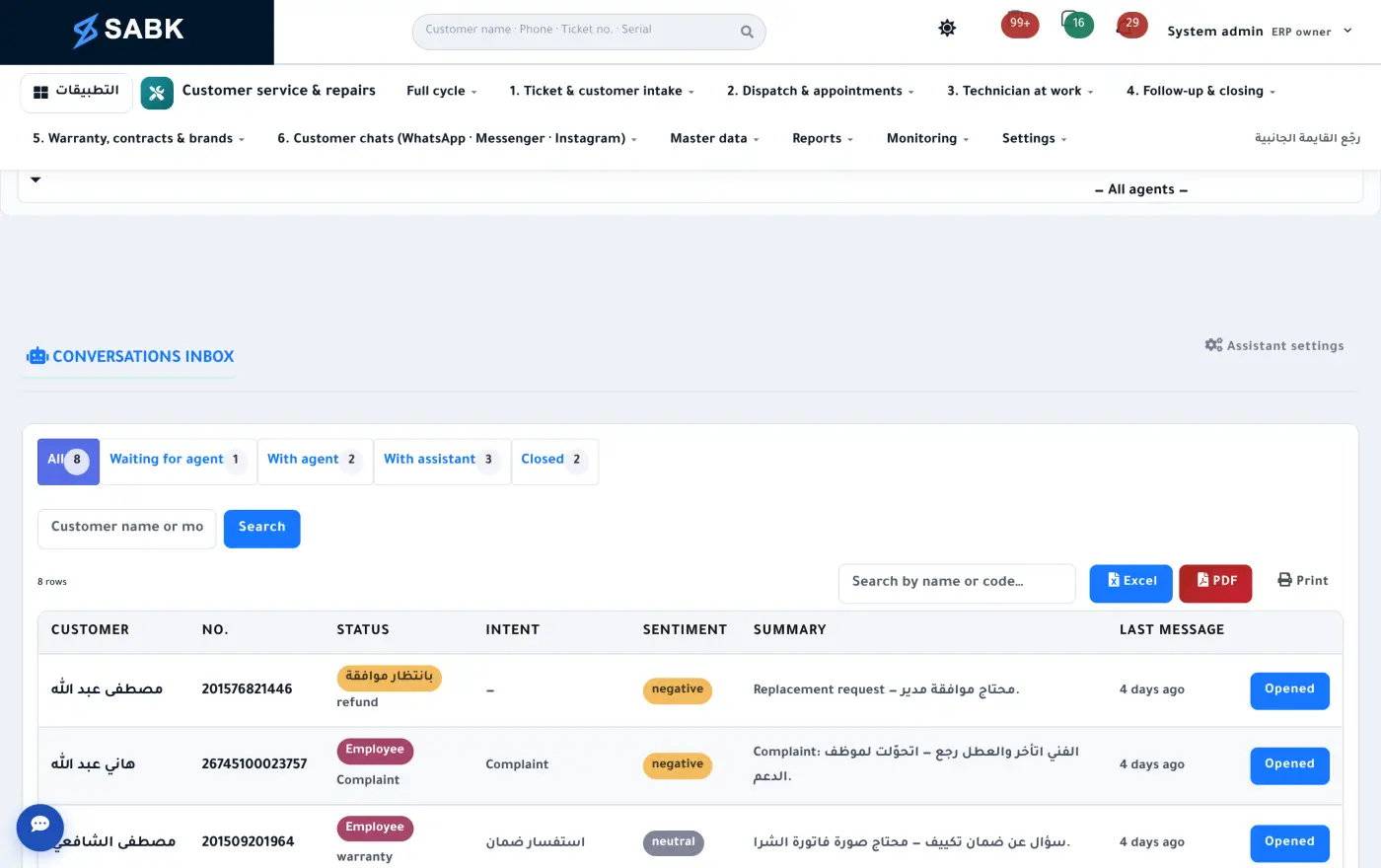
An assistant that answers your customers, with a person approving
It answers from your company’s information and warranty rules, and can prepare an action like rescheduling a visit or opening a ticket. Anything sensitive waits for a staff member to approve it first, and it activates with an AI key under your company’s own account.
A shared conversation inbox with saved replies.
A knowledge base your team edits itself.
Warranty rules that decide what the assistant may say.
An approvals queue, plus usage and cost tracking.
Customer chatAssistant replying
Is my washer still under warranty? Serial 7G42K1180
Yes, your warranty runs until March 2027. Would you like me to open a service request?
Yes please, tomorrow afternoon if possible.
There’s a slot tomorrow from 2 to 4. I’ll send it to our service team to confirm.
Open ticket · awaiting staff approvalApproved · ticket opened
Internal communication
Work talk stays in the system, not on WhatsApp
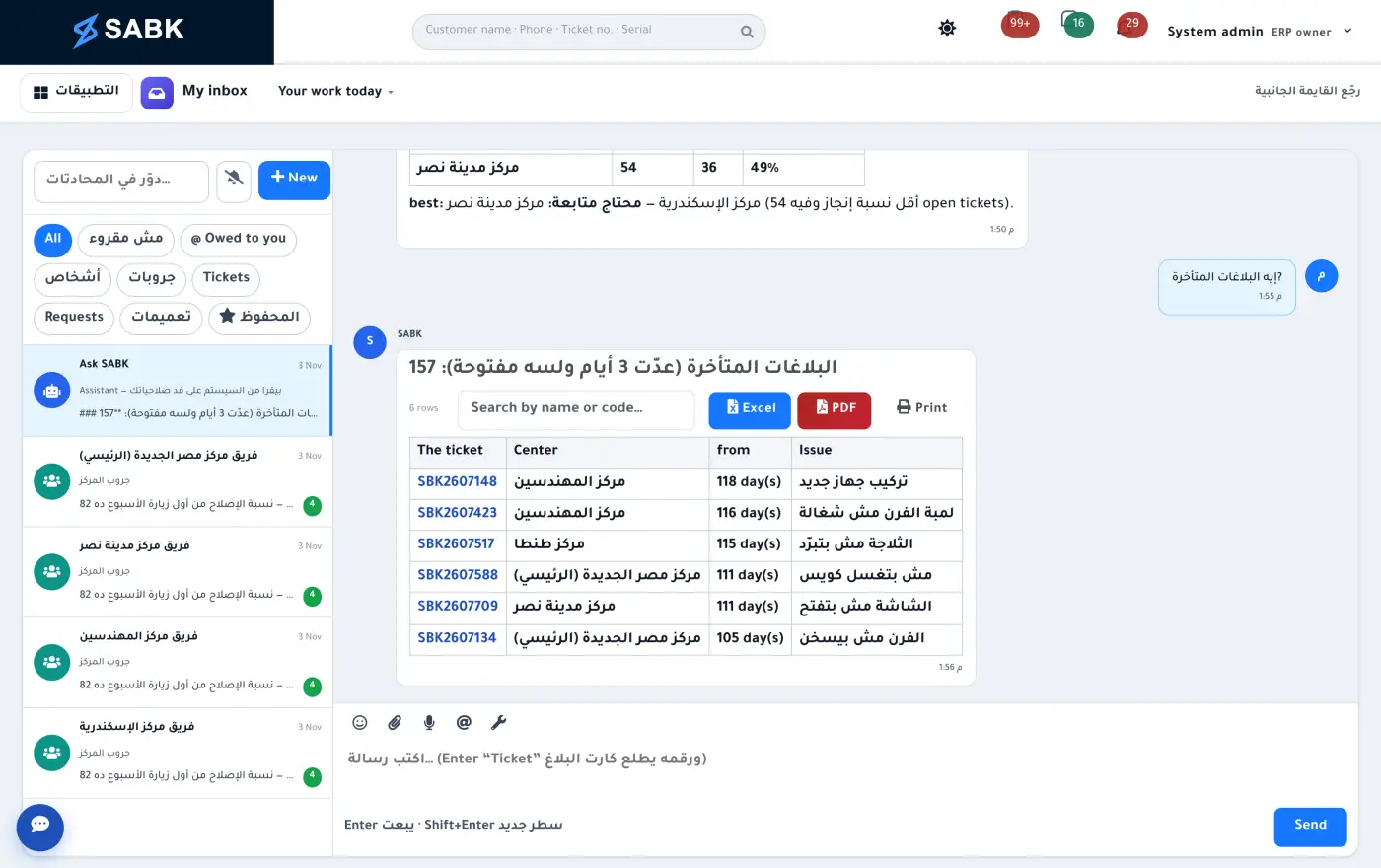
Staff, service centres and technicians chat inside SABK, so the conversation about a job stays next to the job and nobody scrolls a group to find a message.
Direct messages and groups for centres and departments.
A ticket number in a message becomes a live card, shown only to people allowed to see it.
“Ask SABK”: every employee can ask the assistant about their work from the same place.
“Waiting on you”: everything that needs your reply on one page.
Mohandessin centre groupExample
Service supervisorMahmoud, please follow up on ticket 20431 today.
#20431Washer · waiting for a partWaiting for part
The part is in the warehouse, I’ll fit it at 2 pm.
Service supervisorGreat, let the customer know.
👍 2✅ 1
Portals
Everyone you work with gets their own portal
Each portal shows its owner only what’s theirs, and all of them write to the same system — with sign-in by password or a WhatsApp code.
SABKOne database
Customers
Log a request and track it, activate a warranty by QR, see invoices and pay online.
Technicians
Android app (iOS version being prepared for the App Store): today’s visits and route, parts requests, closure by customer code, and biometric login.
Service centers
Their tickets, appointments, statement and monthly score.
Dealers & distributors
Order stock at their own prices, register warranties and see their statement — and reps can log tickets on their behalf.
Suppliers
Confirm purchase orders, and see warranty claims and their scorecard.
Partner systems
A keyed API for tickets, units and warranty, with webhooks to your other systems.
Technician app
Technicians work from their phone. The office sees everything.
An app connected live to SABK, built from a single codebase for Android and iOS — the Android version ships on Google Play under your company’s name, and the iOS version is being prepared for the App Store. No paperwork coming back at the end of the day, and no more “I’ll send you a photo on WhatsApp.”
Today’s route: the day’s visits ordered on the map in one tap.
Spare parts: requested on site, or straight from the unit’s drawing.
Serials and fault tree: scan the serial and pick the root cause at closure.
Works offline: opened tickets stay available, and anything recorded syncs as soon as the signal returns.
Voice reports: the technician talks, the app types.
Visit prep: the likely fault, the parts usually needed and their stock, before setting off.
“Your month”: each technician sees their own numbers: jobs closed, first-time fixes and their rank.
Customer signature and timers: the customer signs on the phone, and the app tracks work time and travel time.
Code-verified closure and biometric login.
Wednesday, 14 OctoberGood morning, AhmedYou have 5 visits today
Today’s route · 5 visits · 38 km
Next visit · 11:00Fridge · not cooling · Nasr City
12:30 · WasherLoud noise when spinning
Close ticket #20431Enter the customer’s code
Ticket closed
Technician library
A factory engineer in every technician’s pocket
Every product gets levelled lessons with video and photos, plus the error codes its display can show. The technician types the code and sees what it means and what to do, from the ticket, at the customer’s door.
The code on the display, what it means, what to do
The unit shows E4? The technician types it as it appears, and SABK returns the manufacturer’s meaning, the repair steps and the video lesson that covers it. Codes for the ticket’s product come first.
Levelled lessons: from the basics to a motor teardown, with management deciding where each technician starts.
Video and photos in every lesson: see the part before you open the unit.
Error codes: every code with its meaning and steps, found whether typed as e-4 or E 4.
Straight from the ticket: a ‘Lessons & error codes’ button on the ticket’s product.
Offline: anything opened once stays available in the basement.
Error codes are separate from fault classification on the ticket (by customer, technician and action), which each company defines for itself in SABK.
Product libraryTop-load washer, 12 kg
Lessons
2Replacing the drain pump3D
1Cleaning the lint filterPhotos
3Motor and gearbox teardown3D
E4Water not draining
What to do
Clean the pump filter, bottom front
Check the drain hose isn’t kinked
If the code returns: replace the drain pump
Lesson: replacing the drain pump · video
3D
Level 2Fridge not cooling: the freezer fan
Training videos
See inside the unit before taking it apart
A short clip for every step, easy to watch standing in front of the customer. Upload the manufacturer’s videos or record your own, and place them in lessons by level.
Parts albums · BOM
Order the part from the drawing, not from memory
An exploded view for every model, each callout linked to its part number in stock. The technician taps the part on the drawing, sees what’s available and orders it for the ticket. No more “the piece next to the motor.”
app.sabk.online/parts/albums/WM-12
WM-12 · Top-load washer, 12 kgAlbum page 1 of 2 · sample data
−100%+
Callouts16 · 16 linked
1Glass lidSP-120112
2Control panelSP-12027
3Control boardSP-12032
4Top coverSP-12049
5Balance ringSP-120514
6Inner drum, 12 kgSP-12066
7PulsatorSP-120718
8Outer tubSP-12084
9Gearbox (clutch)SP-12090
10Drive beltSP-121033
11Motor, 12 kgSP-12115
12Drain pumpSP-121231
13Drain hoseSP-121326
14Dual-coil inlet valveSP-12143
15Suspension rodSP-121540
16Base frame and feetSP-12168
12
Drain pumpSP-1212 · fits 3 models
Main warehouse: 31 in stock
Parts request
No parts yet
Paste the BOM from Excel (callout → part number)Most-requested parts per modelThe same drawing in the technician appStock shown before ordering; shortages go to purchasing
Built for Egypt, under your control
Designed around Egyptian regulations and the way business is done here
Ready for the Egyptian market
E-invoicing and e-receipts on the Tax Authority platform.
Social insurance and payroll tax built into payroll.
VAT and a cheque portfolio.
Arabic and English, with WhatsApp for customers.
Management stays in control
Permissions per user and per report.
Approval levels for spending, purchasing and replacements.
A full audit trail: who changed what, and when.
Group companies consolidated in one report.
Audit trail · sample
Fast start, safe data
“Company setup” walks you through step by step, and every screen opens with its own guide the first time.
Excel import with a preview before saving, and the whole upload can be rolled back.
Your company’s rules change from a settings screen, no code needed.
A daily backup on your company’s own server, downloadable by your system admin.
Two-step verification and segregation of duties, switched on when management decides.
Real screens
This is what work looks like inside SABK
Not mock-ups — screenshots from the system itself, with sample data. Click any screen to enlarge.
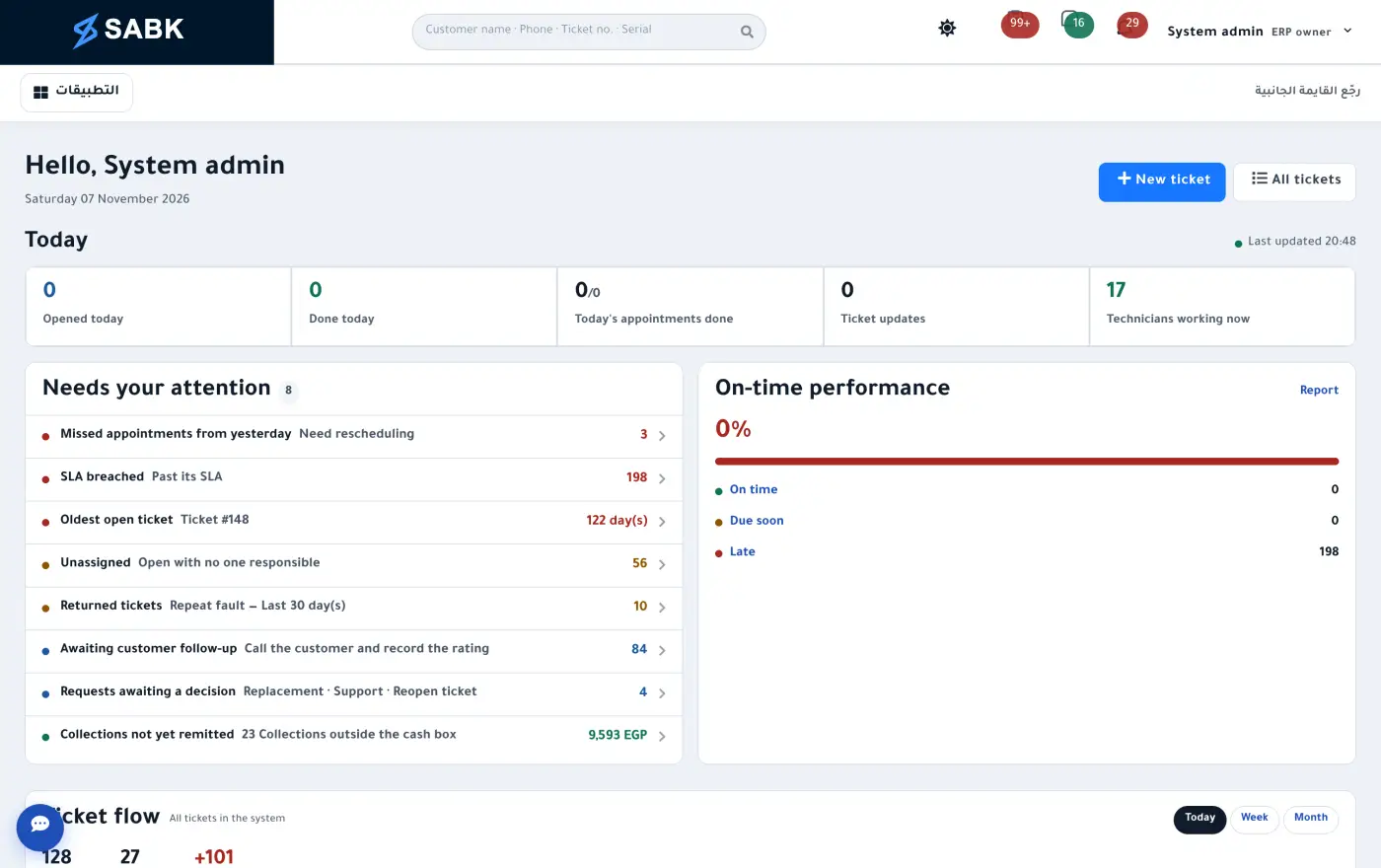
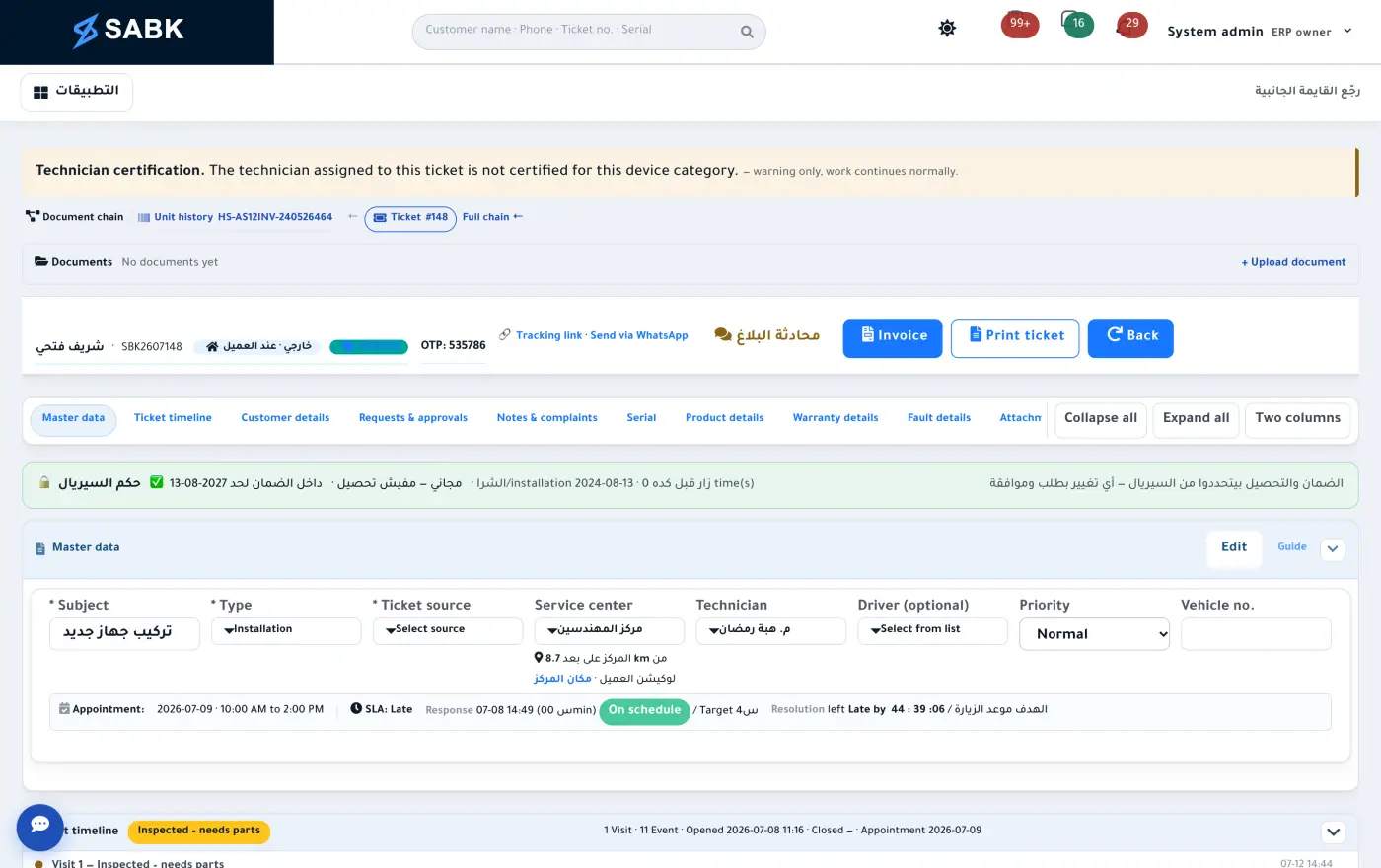
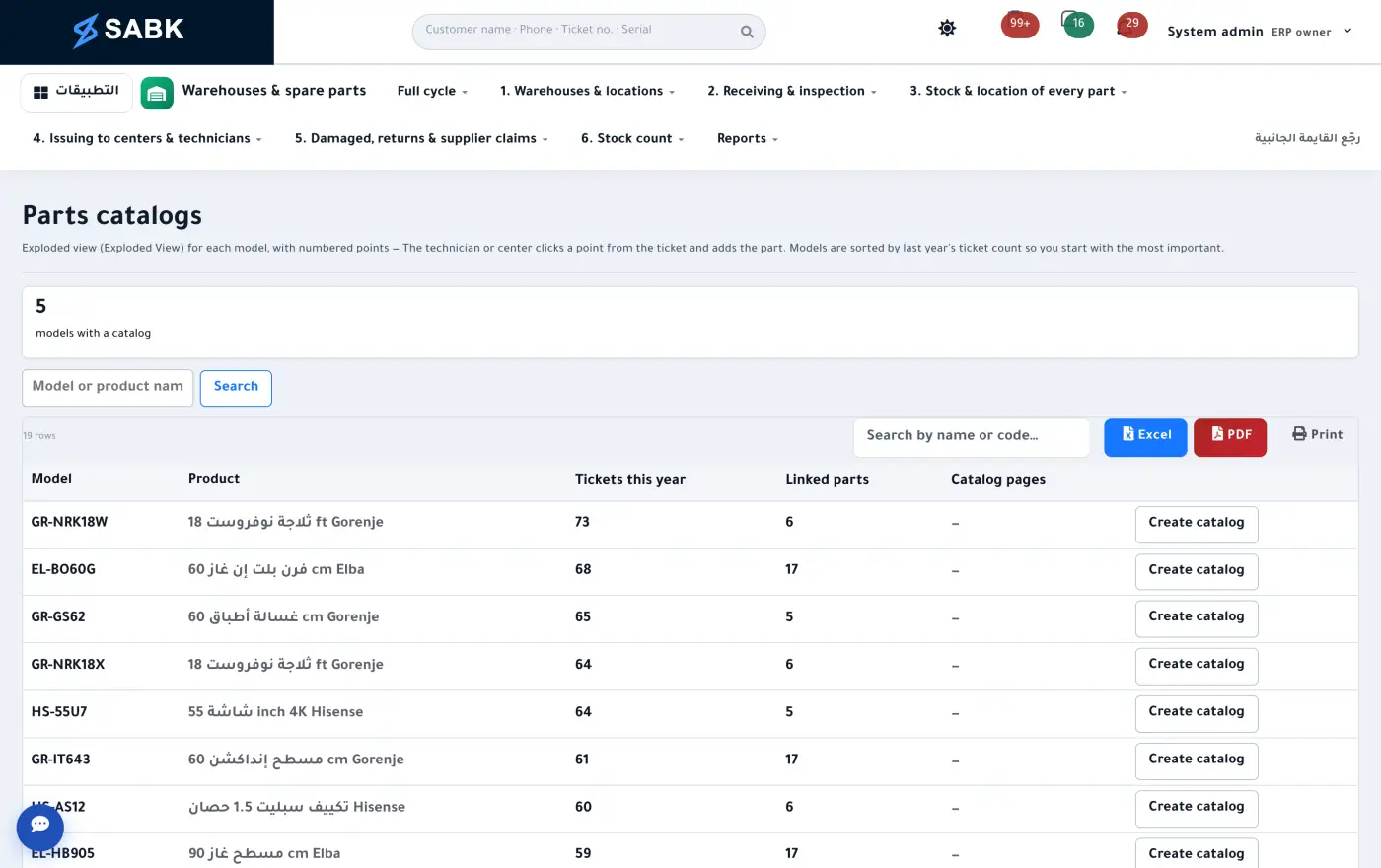
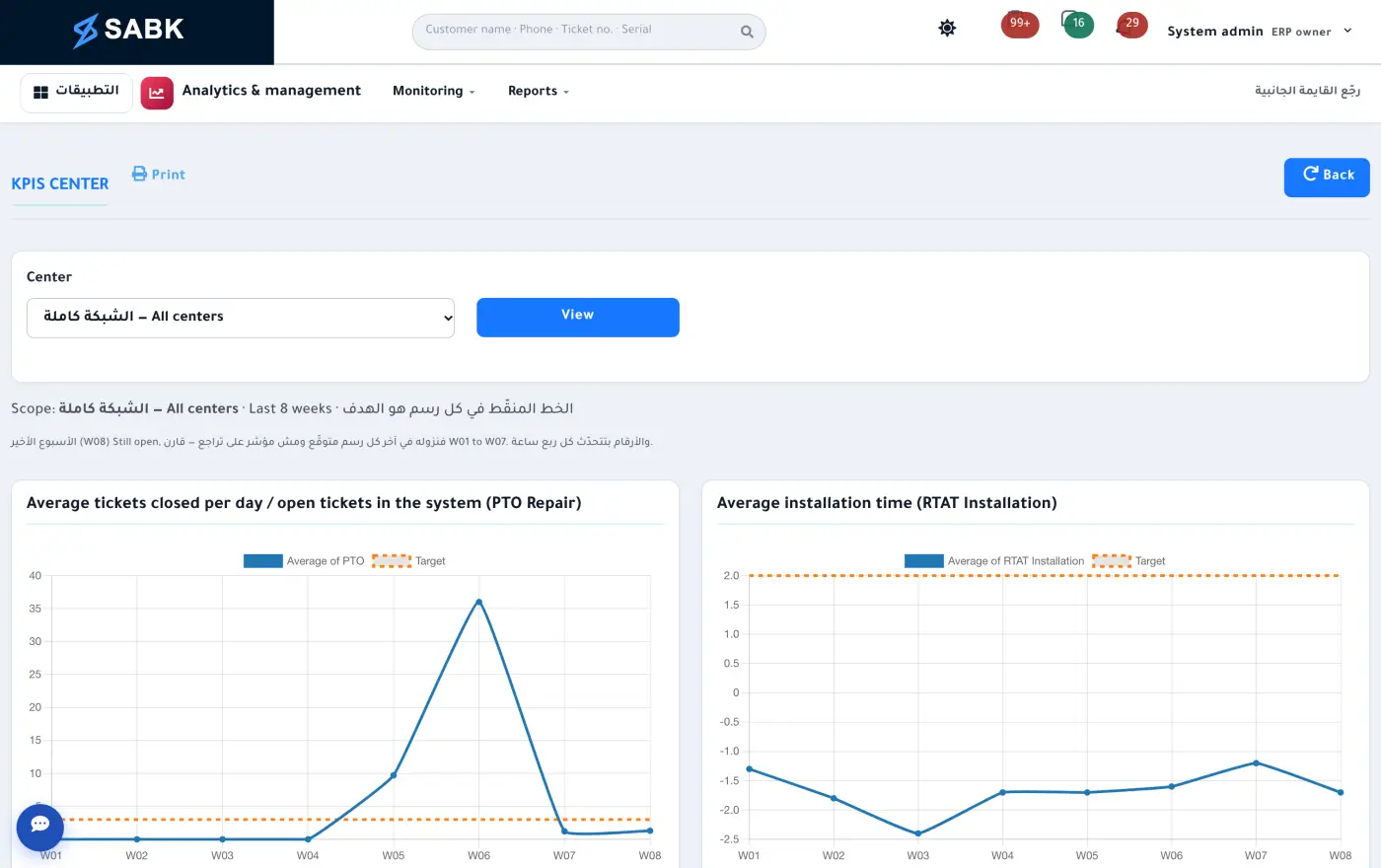
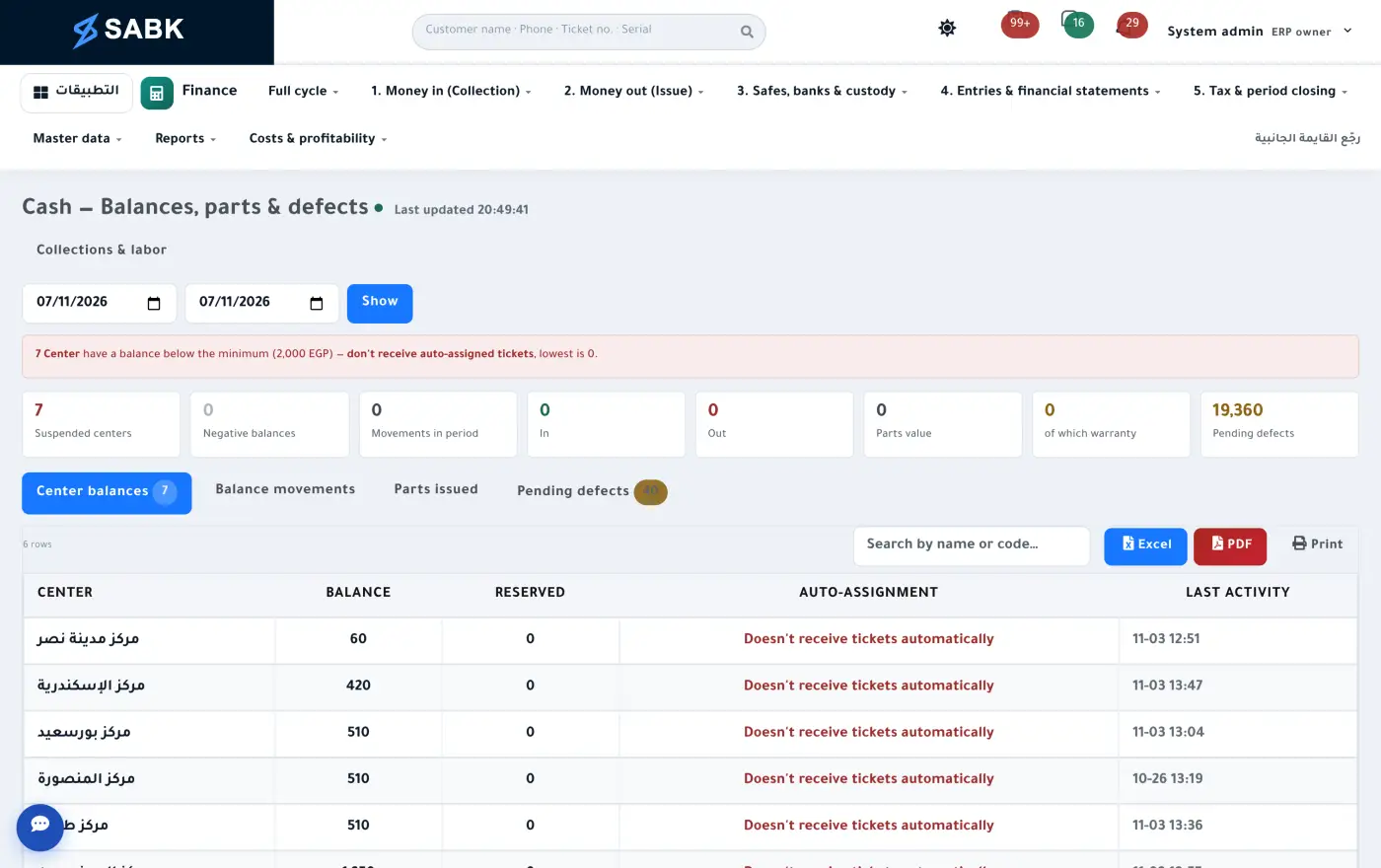
Home: your day on one screenThe ticket: the whole story on one pageTechnicians on the map, right nowBOM album: pick the part from the drawingKPIs: performance in numbersAI assistant: replies, then asks permissionTeam chat: the talk stays next to the workCash: money moves with approvals
Frequently asked questions
Before you book a demo
Who is SABK for?
Companies that want their whole operation on one system, in these lines of business: after-sales service and service centers, computer and mobile shops, supermarkets and hypermarkets, wholesale and distribution, showrooms and retail stores, and restaurants and cafés. You pick your business type and SABK arrives set up for it.
Does it work for a shop, a hypermarket or a restaurant?
For shops, hypermarkets and wholesalers: a POS with shifts, retail, semi-wholesale and wholesale price tiers, dollar-based pricing, inventory, purchasing and accounting. For restaurants and cafés, what is available today is the POS, items, stock, purchasing and accounting; table and kitchen screens are being built.
What does “set up for your business type” mean?
The company chooses its business type, and SABK arrives with that type’s menu, home screen and quick commands. A shop, for example, opens on the trade home screen: sales today and this month, the latest receipts, best sellers and what needs your attention. The core underneath is the same for every business type: inventory, purchasing, accounting and HR.
Does every company get its own link and database?
Yes. Every company gets a link under its own name on sabk.online, with its own database and files. The system is a single code base, so every update reaches every company. Modules, number of users and subscription period are set per company.
Do we have to take all 16 modules at once?
No. Switch on the modules you need and keep the rest off until you’re ready. Everything already lives in the same system, so adding a module never means migrating data.
We don’t manufacture. Is SABK still a fit?
Yes. Shops, wholesalers, importers, distributors and service companies run SABK without the production module, using purchasing, inventory, sales, point of sale, service and finance, each according to its business type.
We work with external authorized service centers. How does that work?
Each center gets its own portal and sees only its tickets. Supervisors see their centers, and management sees everything.
What do technicians need?
An Android phone with the app, published on Google Play under your company’s name and logo (an iOS version is being prepared for the App Store). Technicians see their visits and route, request parts and close tickets with the customer’s code, even without a signal.
Our data is in Excel. How do we bring it over?
Upload Excel files for customers, sold devices, models, spare parts, suppliers, dealers, service centres, technicians and opening stock. SABK shows what will be added and what has problems before saving, and you can roll back a whole upload.
Is our data safe?
Every company has its own installation and its own database. The database is backed up daily and attachments weekly on your company’s server, and your system admin can download any backup directly, without access to the source code.
Is the system in Arabic?
Arabic and English, and every user picks the language they prefer.
Can we connect it to other systems?
Yes. There’s a keyed API with webhooks, plus portals for suppliers and dealers.
30-minute demo
Book a demo for your business
Tell us your line of business, and in 30 minutes we’ll walk through your own work: POS and pricing if you run a shop or a wholesale business, a ticket from opening to closure if you run service, through to inventory, accounting and reports. Together we’ll see whether SABK fits your company. And if you’d rather try it yourself, we’ll open a trial copy with sample data.